
Skip to content

Case studyMarketplace

Finding someone you trust, and booking them again.

Xymbia is a two-sided marketplace where people collaborate to get things done, built on trust. A business sets up shop; a customer finds the providers they already trust and books them again.

Illustration: a cleaner in a Clean Pro uniform and her customer in his tidy living room after the job is done.
My role
Product designer leading design
Platform
Mobile and web, for customers and businesses
My part
  • User flows
  • Prototyping
  • Usability testing
  • Handoff
  • Design system
The problem

Trust is how things get done, and it's hard to find.

People rarely search for a plumber or a tutor. They go back to someone they've worked with before, or someone a friend recommends. That trust lives in memory, chat threads and paper schedules: hard to share, hard to find again.

Difficult to identify available collaborators that are trustworthy.
Gladiator persona, pain point
Building long-term relationships with a trusted workforce that he may not interact with on a regular basis.
Titan persona, pain point
Paper schedules… No email or calendar system currently.
A small cleaning business

One account, two sides.

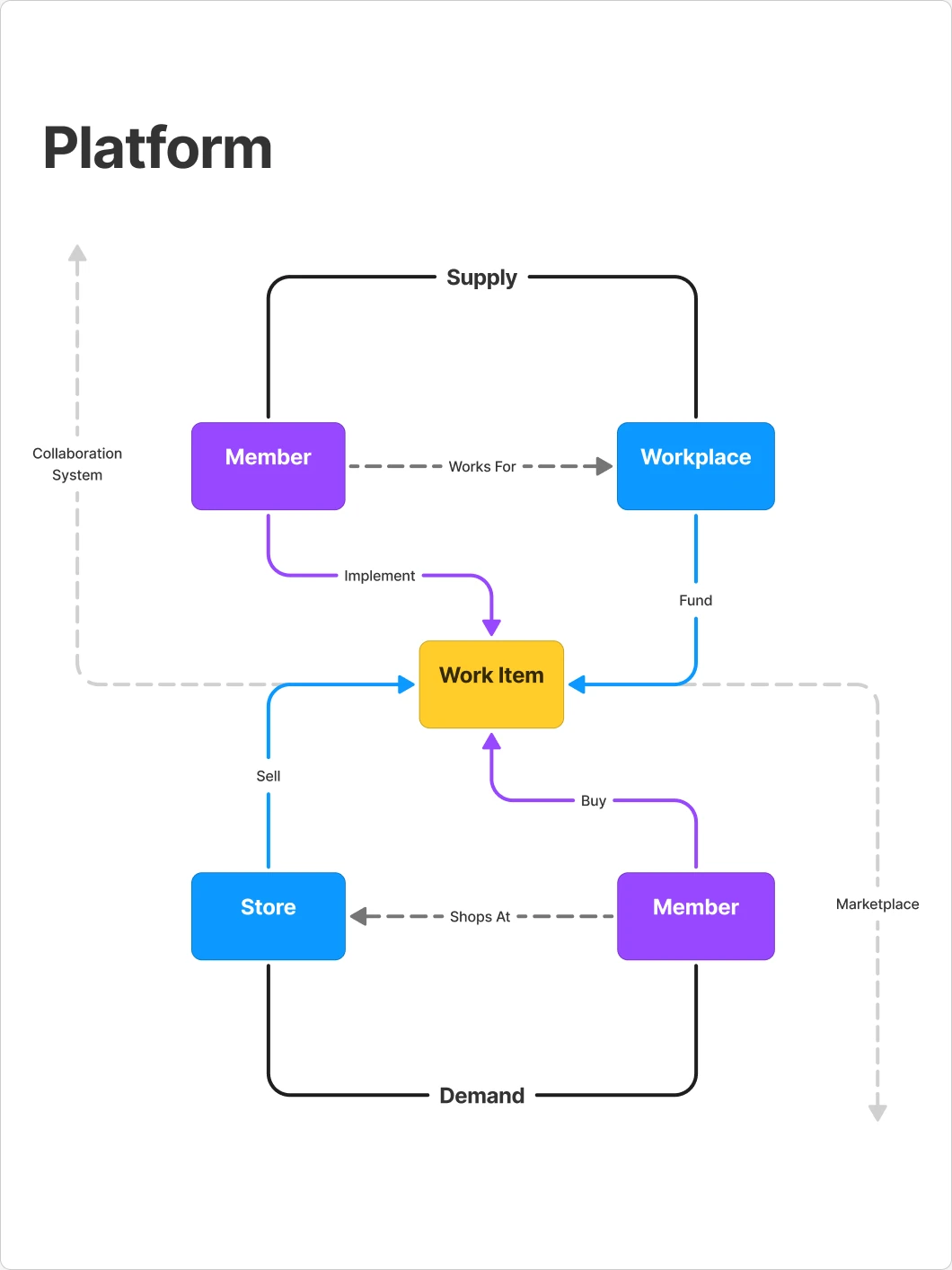
The same member can book a service one day and run a business the next. The platform map ties both sides to the work itself, so every job that goes well makes the next booking easier.

The platform map from the team's FigJam board: on the supply side a Member works for a Workplace, on the demand side a Member shops at a Store, and a Work Item sits between them.
The platform map.
Who it's for

Four archetypes, and none of them have time.

The team's persona cards describe four kinds of members. Each one is short on time, so whatever we built had to save time, not ask for more of it. Pick a persona to see the full card.

Illustrated portrait for the Tyke persona.

Activities

  • Designer on the local robotics team
  • Piano and saxophone player in the marching band
  • Member of the student council
  • Volunteer mentor for a junior robotics team
  • Playing video games and designing things in Minecraft or Roblox

Profile

Extroverted
Analytical
Creative
Time availability
Organised
Risk taker
Utilitarian

Summary

Tyke is highly personable and knows how to handle herself in complex social and academic settings. She is very analytical and off the charts in terms of her creative skills. Her ambition drives her to take calculated risks and stay organised and on top of her work, but also constrains the time she has for herself, friends and family.

Tyke

An over-achieving student who splits her time between school work, extracurriculars and social activities.

Goals

  • Pursue a career in a STEM field with a degree from a prestigious institution
  • Gain practical experience and STEM skills
  • Learn to play multiple musical instruments
  • Create value for her community and friends

Wants and needs

Wants
  • Pursue her passions and increase her abilities
  • Time to hang out with friends, family, or to do nothing
  • Personalised digital and real-life experiences
Needs
  • A clear understanding of everything that needs to get done
  • A clear understanding of all the people who need to help her do things or get to places
  • A simple way to share what she needs to get done, or places she needs to go, with people who can help her

Pain points

  • Too many things happening and no single view of everything that’s happening
  • Too many people involved, with no single view of who is involved in what
  • Too many dependencies on people with little understanding of each other’s schedules or priorities
  • Coordinating with people needs too many apps: Discord for robotics, texts for band and school, Snapchat for social…
  • Mobile productivity tools are too simple or lack personalisation, so most plans end up on paper

Apps

Design: Canva, Solidworks, Fusion, OnShape

Productivity: Class Dojo, Google Classroom

Gaming: Minecraft, Roblox

Social media: Snapchat, TikTok, Instagram, Pinterest

One account, two roles

The same person can book, or run a business.

Xymbia started as a personal space for tasks, events and calendars. Xymbia Pro lets the same person run a business from it, with a shop, services and bookings, and no second account.

The upgrade starts where people already are.

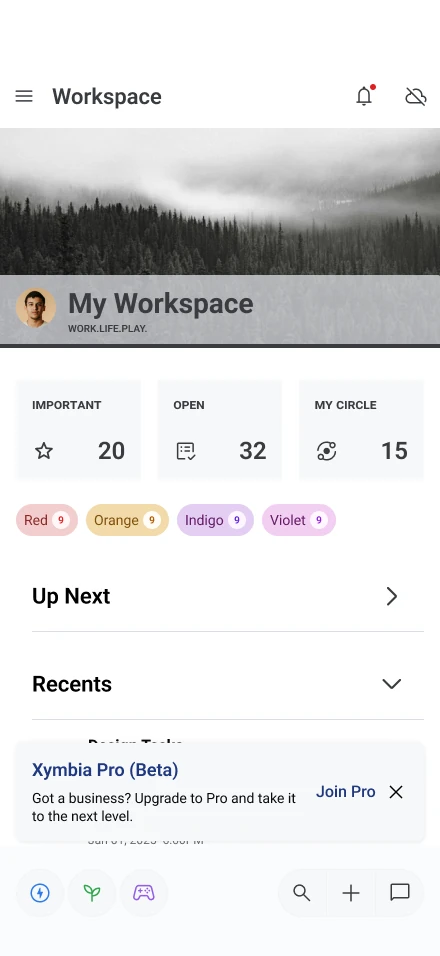
The invitation sits right in the personal workspace: “Got a business? Upgrade to Pro and take it to the next level.” Pro is offered free while in beta.

My Workspace home with a card inviting the user to join Xymbia Pro (Beta).
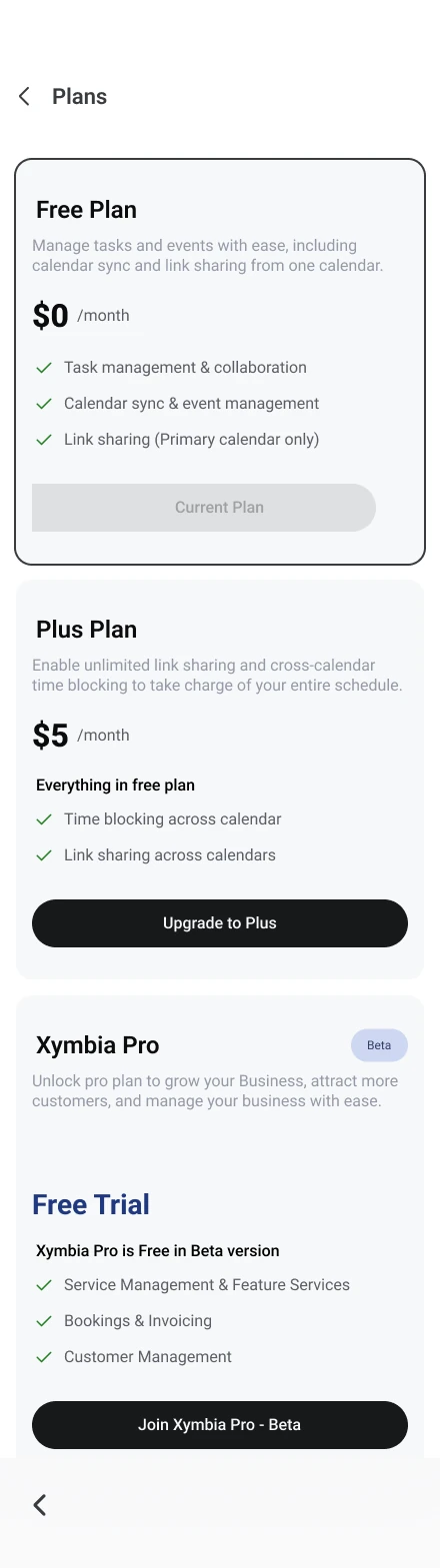
Plans screen: Free Plan, Plus Plan and Xymbia Pro in Beta.
The personal workspace, and the plans screen.

Setting up a business

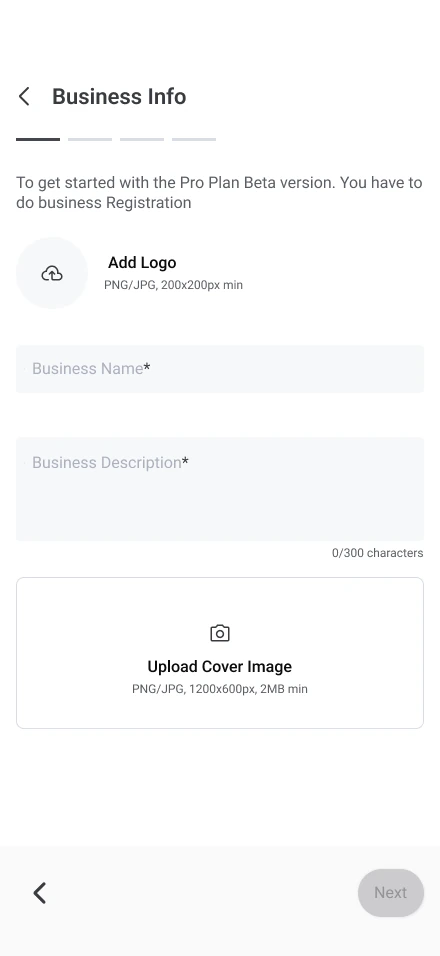
  1. Business Info: logo, business name, description and cover image.
    Business info
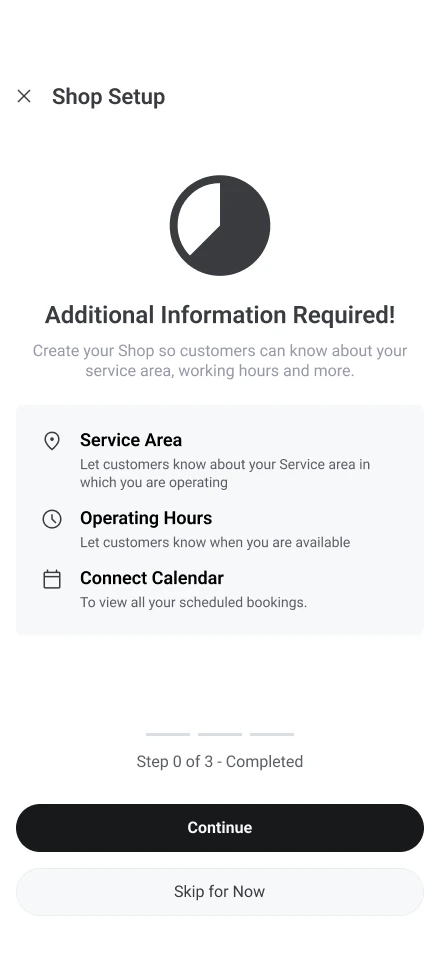
  2. Shop Setup checklist: Service Area, Operating Hours and Connect Calendar.
    Shop setup
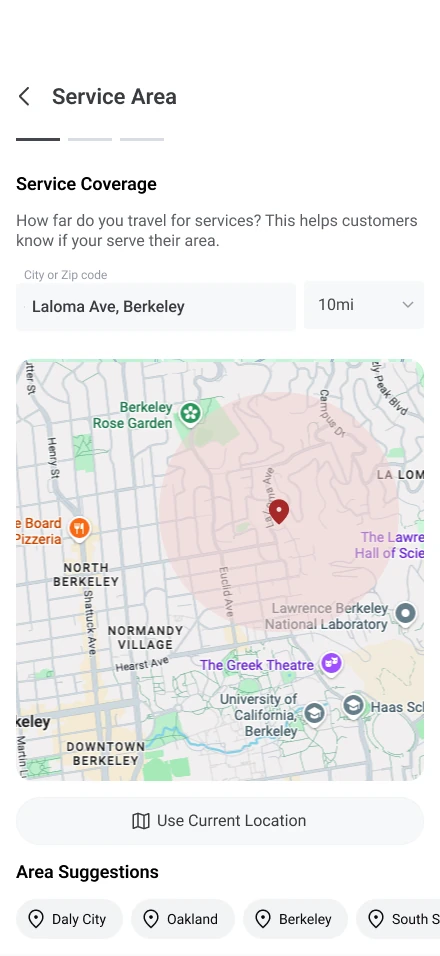
  3. Service Area with a radius map.
    Service area
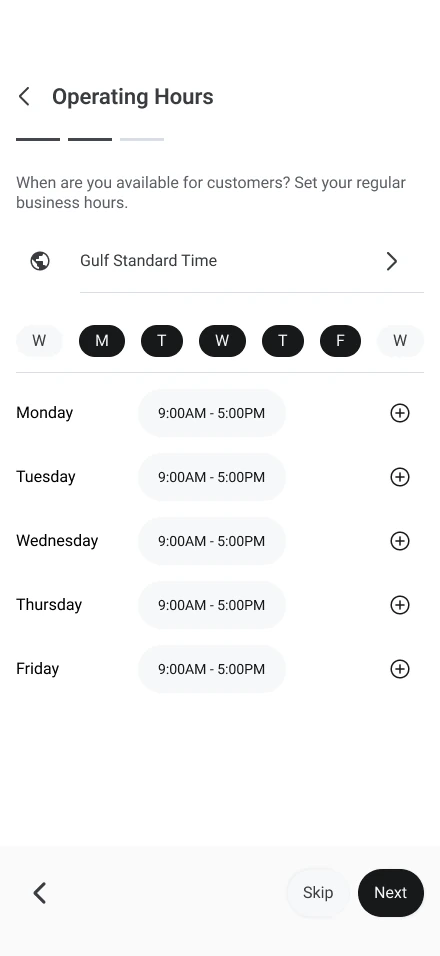
  4. Operating Hours for each weekday.
    Operating hours
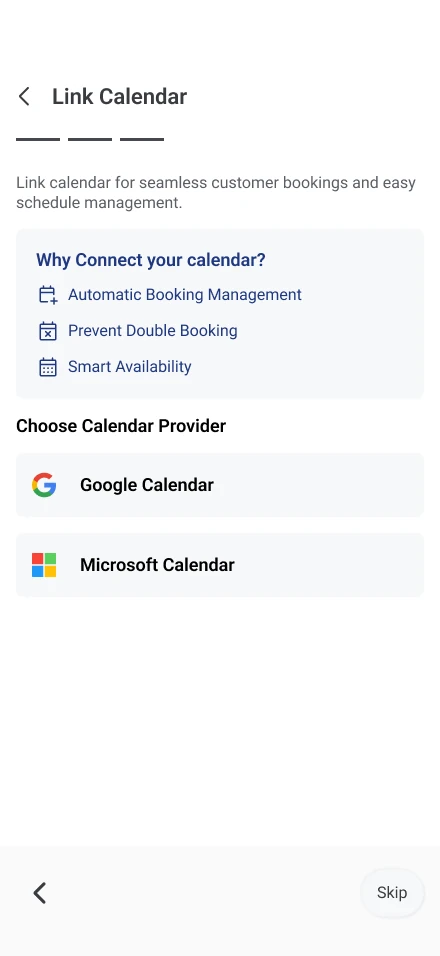
  5. Link Calendar: Google Calendar or Microsoft Calendar.
    Link calendar
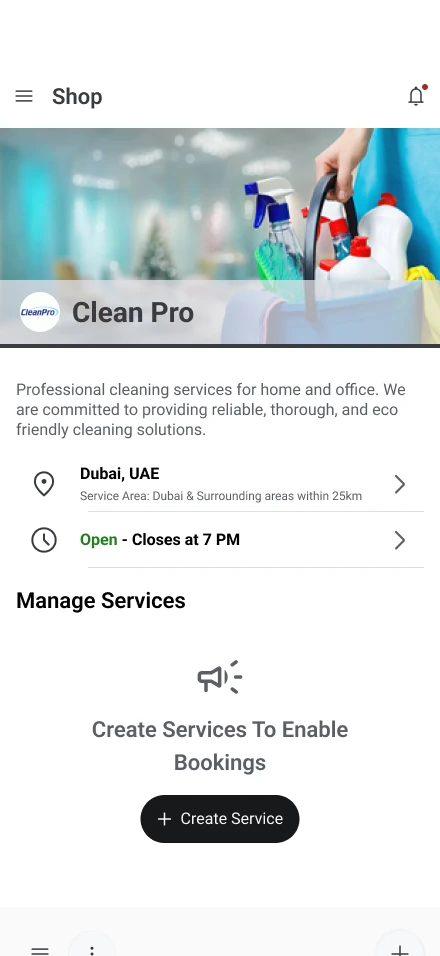
  6. The finished shop, ready for its first service.
    The shop
Linking a calendar is part of setup, not an extra: it prevents double bookings and keeps availability accurate.
One booking, both sides

A booking sounds simple until it repeats.

A first visit becomes a weekly one, an appointment is missed, a customer goes on holiday. Most of the design work happened in rules like these, before any screen was drawn.

The customer's side: booking a free first consultation.

Keep scrolling, the strip moves with you.Swipe sideways through all seven steps.

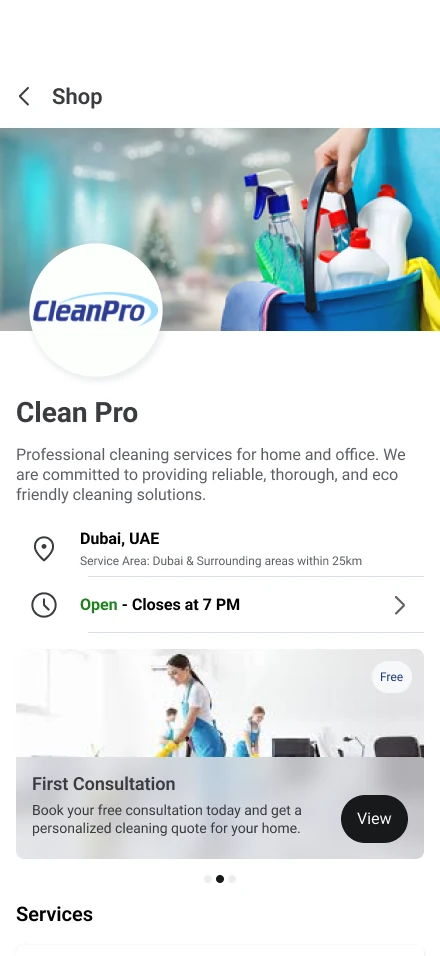
Clean Pro shop with a First Consultation card.
1 · Find the shop, tap the free consultation
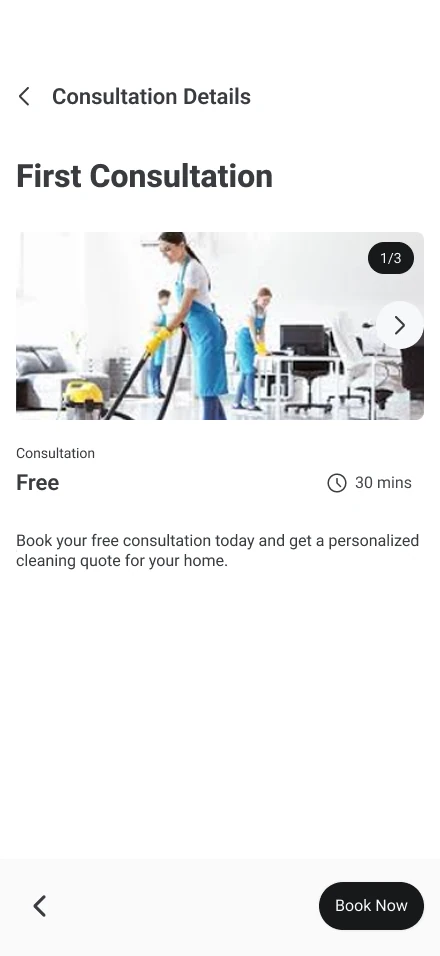
Consultation details: free, 30 minutes, with Book Now.
2 · Check the details, tap Book Now
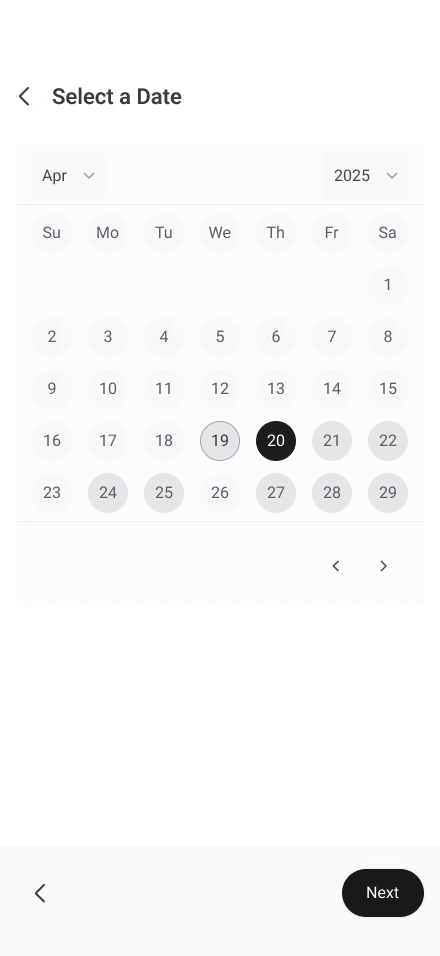
Select a Date, with one date picked on the month calendar.
3 · Pick a date
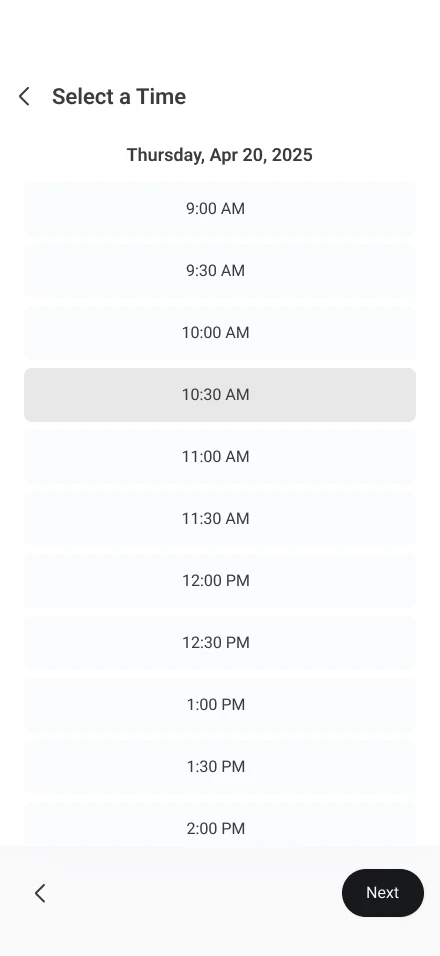
Select a Time, with one half-hour slot picked.
4 · Pick a time
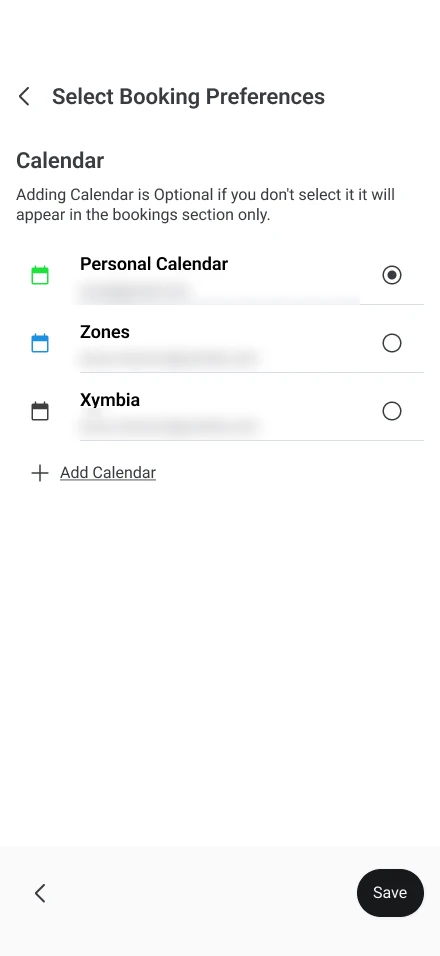
Select Booking Preferences: which calendar to add the appointment to.
5 · Choose the calendar to add it to
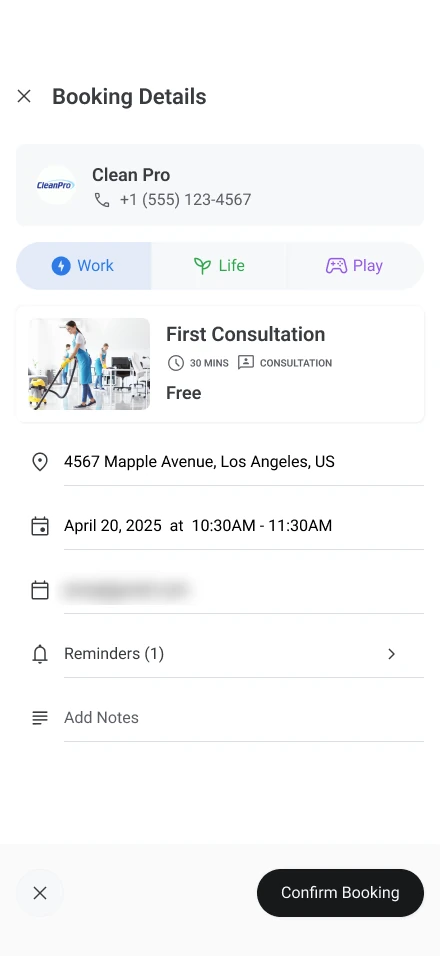
Booking Details with Confirm Booking. The email is blurred.
6 · Review and confirm
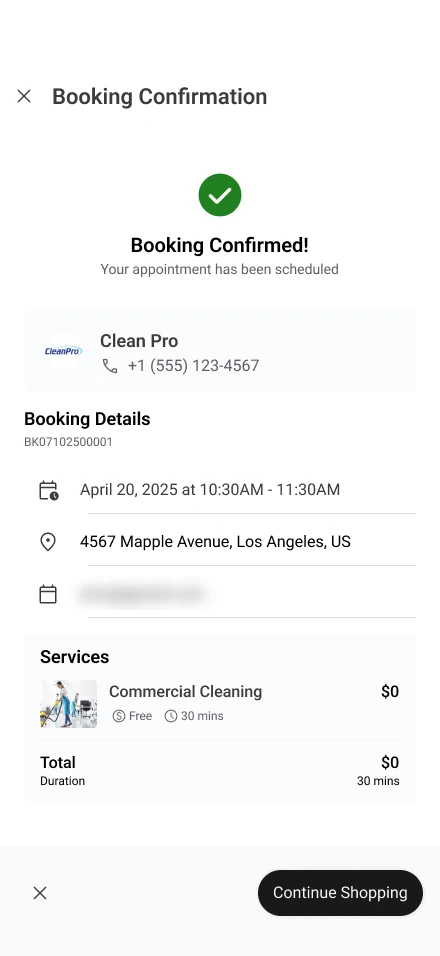
Booking Confirmation: Booking Confirmed, your appointment has been scheduled.
7 · Booked
Tested before built

Prototype first, then test, then build.

Changing a prototype takes minutes; changing a built flow means engineering time, rework and another release. So clickable prototypes went in front of people first, with written task cards for every session, and build effort only went to flows that held up.

What testing showed us

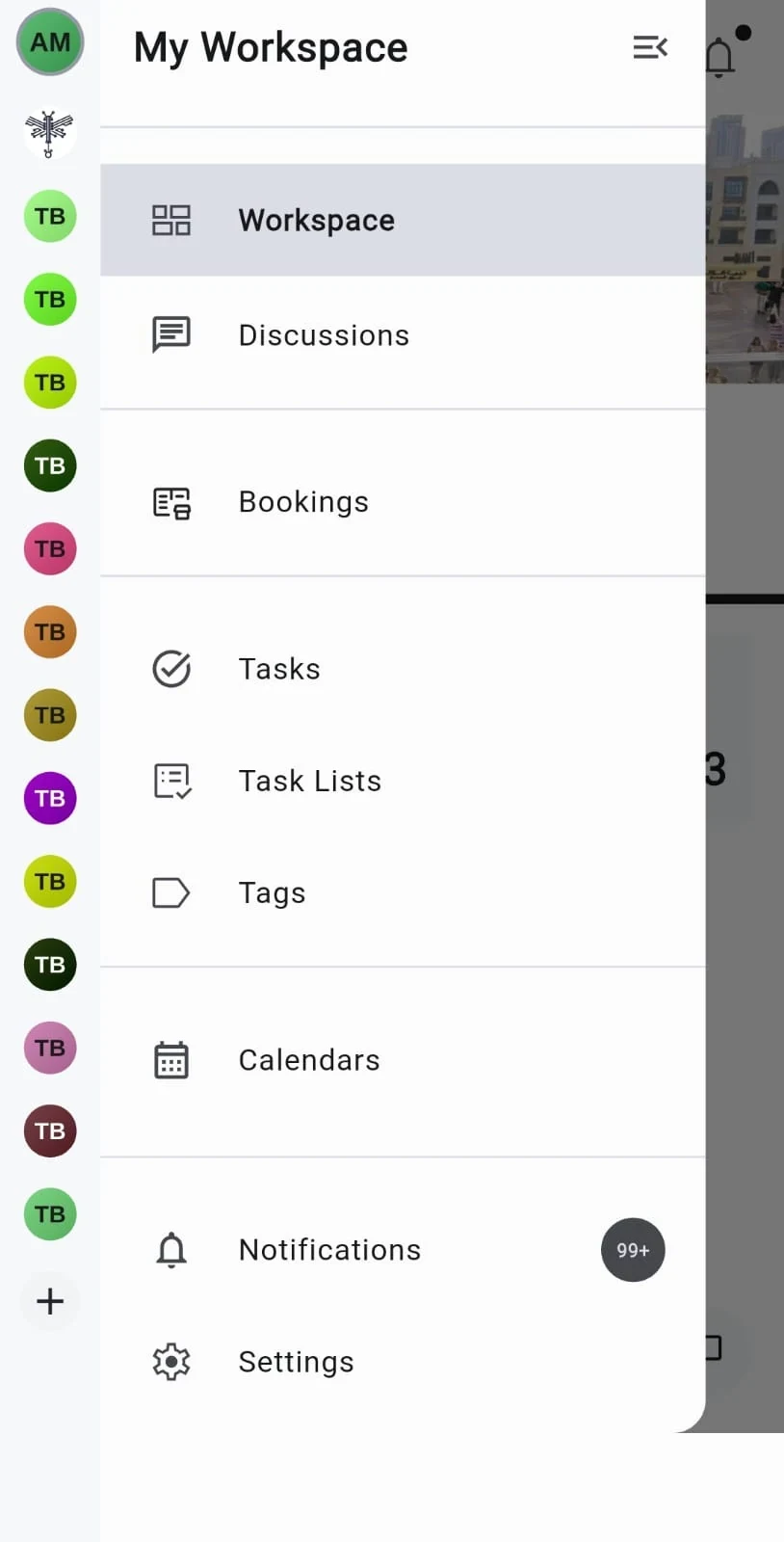
The side navigation tested, with items Workspace, Discussions, Bookings and more.

Businesses were hard to find.

Nobody found a business’s shop on their own, and tapping a business opened its collaboration space, not the shop.

The fixA visible “Browse businesses” entry in navigation, and businesses open on their Shop tab.

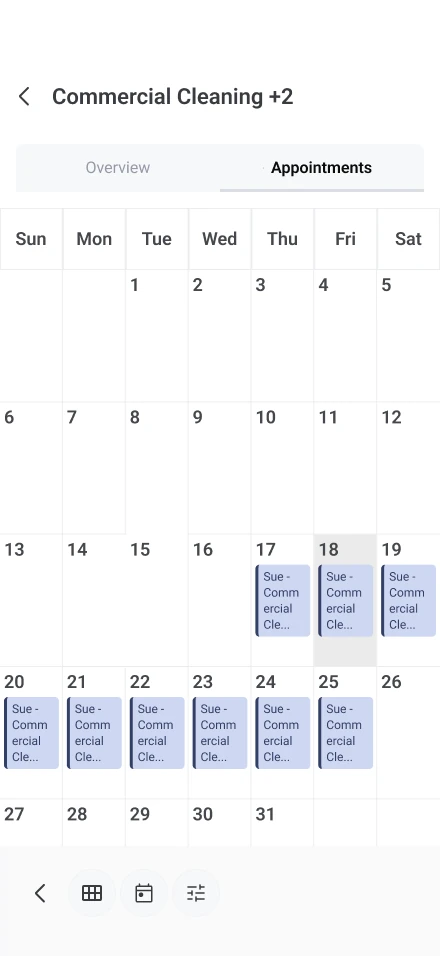
A month calendar of repeat appointments inside one booking.

Booking or appointment? People couldn't tell.

Participants looked for appointments inside booking details. It was the same question we had left open on our own board.

The fixAppointments become a distinct, visible tab; for one-time bookings, question whether a separate appointment is needed at all.

The personal workspace, where the Join Pro card sits.

The way into Pro, and into messages, was hidden.

Most participants needed help to find the upgrade, and businesses didn't recognise “Discussions” as messaging.

“Paid features should be more prominent for first-time users. You are losing users here.”

The fixA prominent upgrade call to action in the main app, and “Discussions” renamed to “Messages”.

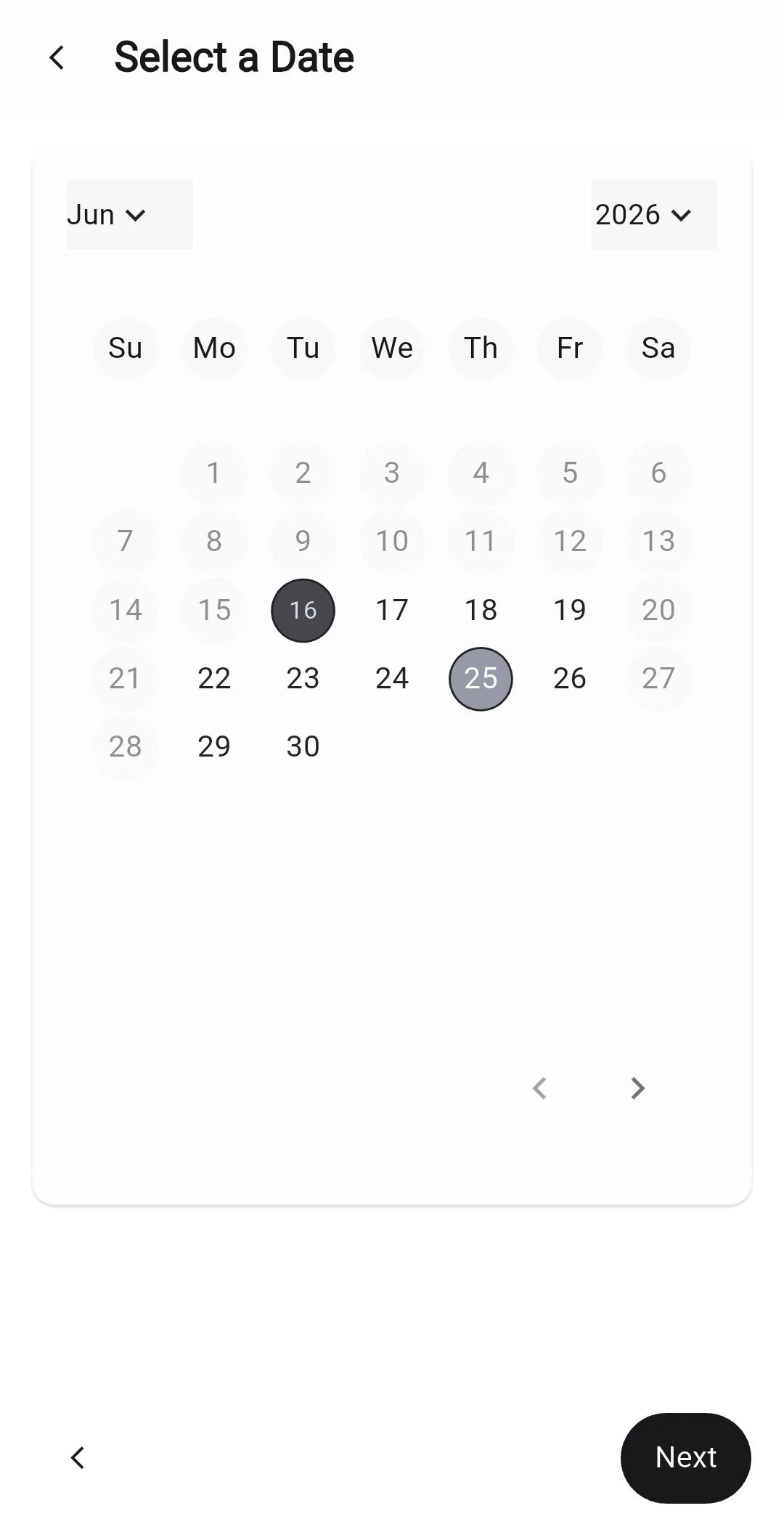
Date picker in light mode as tested.
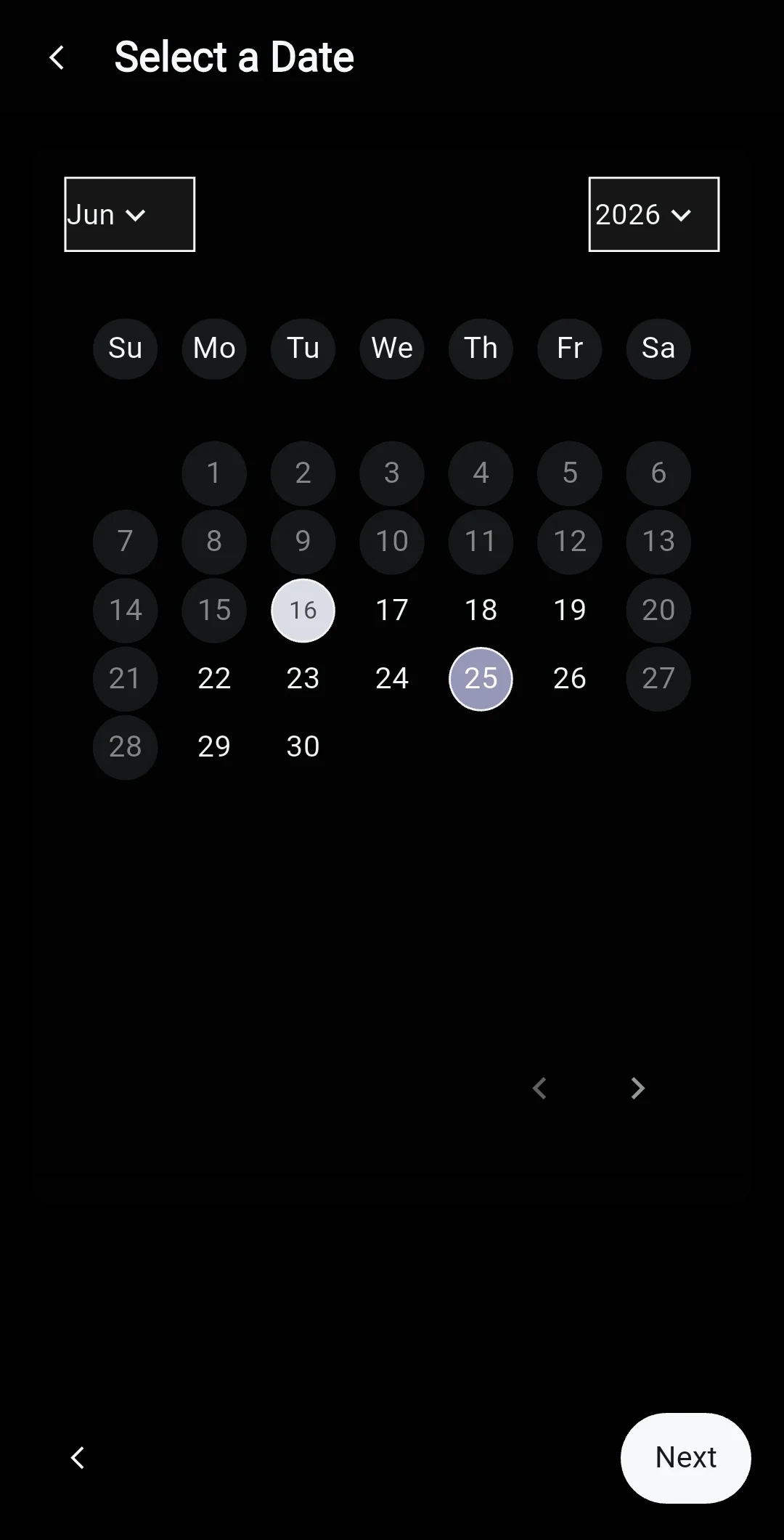
Date picker in dark mode as tested, where available and disabled dates look alike.

Small details, real hesitation.

Today's date looked more selected than the selected date, and in dark mode available and disabled dates looked the same. One participant read it as a range picker.

The fixMake the selected state the strongest, clearly separate past, available, today and selected, and fix dark-mode contrast.

What already worked

  • Cancelling a booking, completed independently by everyone.
  • Managing an appointment, smooth across all sessions.
  • Business onboarding, completed by everyone; the friction was in details, not the structure.
  • Checking a booking and contacting the business, done without help.

What we set for the next round

  • A visible way for customers to discover businesses
  • The Pro upgrade as a clear call to action
  • “Discussions” renamed to “Messages”
  • Appointments as a top-level tab
  • Test with people closer to the target: small business owners and active bookers
Outcome

Xymbia Pro is live in beta.

The fixes from testing went back into the designs, and Xymbia Pro launched in beta, on a design system built for it from scratch.

Looking back

Next time, I will design and deliver less, test more frequently and iterate on feedback.

Next case studyHealthcare Marham

A platform connecting patients with doctors, pharmacies and labs.

Read case study